How to Test REST APIs - Complete Step-by-Step Guide (2026)
Learn how to test REST APIs with this step-by-step tutorial. Includes tools, best practices, code examples, and a downloadable checklist. Updated 2026.
Introduction
A REST API is the bridge that lets one application talk to another over HTTP. It is the layer that powers mobile apps, web apps, dashboards, payments, authentication, and many other modern software experiences. When that layer breaks, the impact is immediate. Requests fail, data becomes inconsistent, and users quickly notice problems.
That is why learning how to test REST API behavior is not optional for developers, QA teams, or even product owners who want reliable software. Good testing helps you confirm that endpoints return the right data, handle errors correctly, secure sensitive information, and perform well under load. It also reduces release risk by catching issues before they reach production.
In this guide, you will learn REST API testing from the ground up. We will cover HTTP methods, setting up your environment, creating your first test, validating JSON and status codes, and automating repeatable checks. You will also see practical tools, common mistakes to avoid, and API testing best practices you can apply immediately.
What is REST API Testing?
REST API testing is the process of checking whether an application programming interface behaves the way it should. In simple terms, you send a request to an endpoint and verify the response. That response might include JSON data, an HTTP status code, headers, or an error message.
This matters because APIs are the backbone of many applications. They connect frontend interfaces to databases, microservices, payment gateways, CRMs, and third party systems. If an API fails, the entire product can feel broken even if the user interface still loads.
API testing usually covers functionality, validation, security, performance, and reliability. It helps you confirm that GET requests return the correct data, POST requests create records, PUT and PATCH requests update records properly, and DELETE requests remove resources safely. It also helps you confirm that the API responds correctly when something goes wrong.
In practice, REST API testing is used for feature testing, regression testing, integration testing, and release verification. It is one of the fastest ways to catch broken logic before users do. For official background on HTTP semantics and response behavior, see MDN Web Docs, HTTP Semantics (RFC 9110), and the JSON specification.
Prerequisites
You do not need to be an advanced programmer to get started. Basic comfort with web requests, URLs, and simple JSON is enough to follow along. If you understand what an endpoint is and have seen a request and response before, you are ready.
For this guide, we will mention tools like API Test Lab, Postman, and Insomnia, but you can follow the concepts with almost any client. No coding experience is required for the first half of the process, although a little scripting becomes useful when you start automating tests later.
If you are brand new, focus on learning the request method, request body, response body, and status code. Those four pieces explain most of what happens during API testing.
Step 1: Understanding HTTP Methods
Before you test endpoints, you need to know what each HTTP method is supposed to do. This is one of the most important foundations in API testing because the method tells you the intent of the request.
GET is used to retrieve data. It should not change server state. A common example is fetching a list of users.
GET /api/usersPOST creates a new resource. This is often used when submitting a form, creating a user, or adding an order.
POST /api/users
Content-Type: application/json

{
  "name": "Ava",
  "email": "ava@example.com"
}
PUT usually replaces an existing resource. It is best when you want to send a full updated version of the object.
PUT /api/users/12
Content-Type: application/json

{
  "name": "Ava Johnson",
  "email": "ava@example.com"
}
PATCH updates part of a resource. Use it when only one or two fields need to change.
PATCH /api/users/12
Content-Type: application/json

{
  "name": "Ava J."
}
DELETE removes a resource.
DELETE /api/users/12When you test these methods, you are checking both the request and the business rule behind it. For example, a GET endpoint should not modify data. A DELETE endpoint should not return a successful response if the record does not exist. A POST endpoint should validate required fields.
This is also where API testing best practices begin. If the method is wrong or the endpoint behaves unexpectedly, the bug is often in the contract between client and server, not just in the code.

Step 2: Setting Up Your Testing Environment
A good testing environment makes API testing easier, faster, and less error prone. You need a way to send requests, inspect responses, and repeat tests without confusion.
You can use a free API testing tool such as API Test Lab, or you can choose Postman or Insomnia. If you want API testing without Postman, there are now several lightweight options that still cover the essentials. The best tool is the one your team will actually use consistently.
To set things up, start with these basics. Create a workspace or collection for your project. Save the base URL for your API. Organize endpoints by feature. Add environment variables for things like tokens, IDs, and staging URLs. This keeps tests reusable and easier to maintain.
A practical setup also includes sample JSON payloads, test accounts, and clear notes on expected responses. That saves time when multiple people are testing the same API. If your team is working on frequent releases, a tool like API Test Lab can make the workflow feel much faster. In many teams, that kind of setup leads to 60% Faster Testing because less time is wasted repeating manual steps.
For a more structured workflow, keep your environment focused on three things: stable test data, saved requests, and readable response logs. That is usually enough to start producing reliable results.
Step 3: Creating Your First Test
Now let us create a simple first test. We will use a sample endpoint that returns a user profile.
GET /api/users/12Your goal is to confirm three things. First, the request succeeds. Second, the response contains the right data. Third, the data matches what your application expects.
Open your API client and enter the endpoint. Choose the GET method. Send the request. Then inspect the response body, headers, and status code. A successful response might look like this:
{
  "id": 12,
  "name": "Ava Johnson",
  "email": "ava@example.com",
  "role": "admin"
}
A valid test checks more than just whether the response exists. It verifies that the ID is correct, the email is in the right format, and the role field contains the expected value.
A simple test script could look like this in a JavaScript based tool:
pm.test("Status code is 200", function () {
  pm.response.to.have.status(200);
});

pm.test("User ID is 12", function () {
  const jsonData = pm.response.json();
  pm.expect(jsonData.id).to.eql(12);
});

pm.test("Email field exists", function () {
  const jsonData = pm.response.json();
  pm.expect(jsonData.email).to.exist;
});
Common mistakes at this stage include forgetting authentication headers, using the wrong environment, expecting the wrong ID, or testing with stale data. Another mistake is assuming success just because the API returned JSON. The response can still be incorrect even if it looks neat.
When documenting this step in a blog or tutorial, a few screenshots help a lot. Show the request screen, the response body, the status code, and the test result panel. That makes the process easier for beginners to follow.
Step 4: Testing Different Response Types
Real APIs do not always return perfect success responses. They also return validation messages, authorization errors, empty lists, and server errors. Good API testing covers all of those cases.
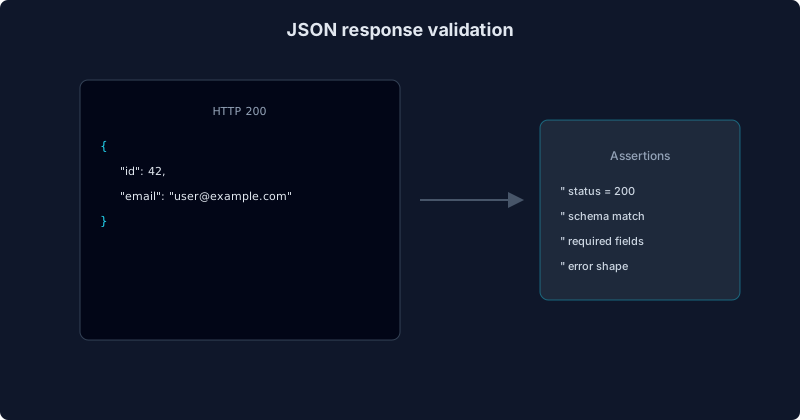
The first thing to verify is the response format. Many REST APIs return JSON, so you should check whether the payload is valid JSON and whether its structure matches your contract. For example, an endpoint that returns a list of users should consistently return an array, not a single object on one request and an array on another.
Next, confirm the status code. A successful request may return 200, 201, or 204 depending on the method. A validation failure might return 400. An unauthorized request might return 401. A forbidden request might return 403. A missing resource often returns 404. An unexpected server failure usually returns 500.
Error handling is just as important as success handling. If a user leaves a required field blank, the API should tell them exactly what is missing. If a token is expired, the API should return a clear auth message. If the request is malformed, the response should explain the problem without exposing sensitive internal details.
Validation matters too. Check data types, required fields, minimum and maximum length, and allowed values. If a field should be numeric, make sure the API does not silently accept text. If a date field must use ISO format, verify that the response follows that rule every time.
Step 5: Automating Your Tests
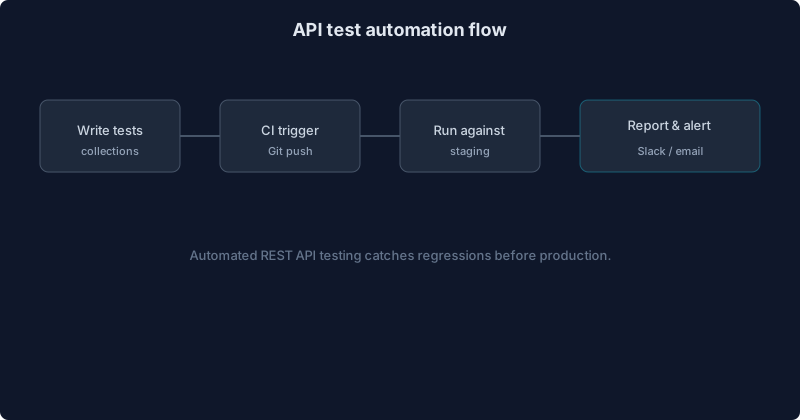
Manual testing is useful, but it does not scale well. Once your API grows, automation becomes essential. Automated tests let you repeat checks on every build, release, or pull request without redoing the same manual work.
Automation matters because APIs change often. A developer may update validation, rename a field, or change a status code. Automated tests catch those changes early. They also save time during regression testing and make release checks more consistent.
You can automate API testing with tools such as Newman, Jest, Cypress, Playwright, REST Assured, or custom scripts in Node.js or Python. Many teams start by converting the most important manual checks into saved requests and then move toward CI pipelines.
A basic automation example in Node.js using fetch could look like this:
async function testUserEndpoint() {
  const response = await fetch("https://example.com/api/users/12");
  const data = await response.json();

  if (response.status !== 200) {
    throw new Error("Expected status 200");
  }

  if (!data.email) {
    throw new Error("Email is missing");
  }

  console.log("API test passed");
}

testUserEndpoint().catch(console.error);
The best automation strategy is to start small. Automate your most stable, high value endpoints first. That creates a strong base for API test automation and reduces repetitive work over time. Explore API Test Lab features when you are ready to go further.
Common Mistakes to Avoid
Many beginners make the same mistakes when learning API testing. The first mistake is testing directly in production. That can create real data issues, slow down live users, or trigger unwanted side effects. Always use a safe environment whenever possible.
The second mistake is only testing happy paths. APIs also need validation checks, auth checks, and error handling checks. A feature that works when everything is perfect may still fail the moment a user enters bad input.
The third mistake is ignoring response codes and focusing only on the body. A response may contain the correct JSON while still returning the wrong status code.
The fourth mistake is not using realistic test data. Fake or incomplete data can hide real issues. Use data that resembles actual usage.
The fifth mistake is skipping performance checks. Even if the API returns the right data, it can still be too slow for a good user experience.
The sixth mistake is failing to clean up test records. If tests create data, make sure they also remove it or isolate it properly.
Best Practices for API Testing
Good API testing is about consistency, coverage, and clarity. Use dedicated test data instead of production data whenever possible. That makes test results easier to trust and easier to repeat.
Automate the tests that run often. That includes login, checkout, account creation, and other critical flows. Manual testing should support automation, not replace it.
Test edge cases. Try empty payloads, very long strings, unsupported values, expired tokens, and invalid IDs. These are the cases that often reveal hidden weaknesses.
Monitor performance as part of your testing routine. Even a valid response can be too slow if the endpoint takes several seconds to return.
Document your expectations clearly. Every endpoint should have a defined request format, response format, and status code behavior. That is one of the most important API testing best practices because it keeps everyone aligned across development, QA, and product teams.
For more fundamentals, see our API testing overview and REST API testing basics.
Tools for REST API Testing
There are many tools available, and the right choice depends on your workflow.
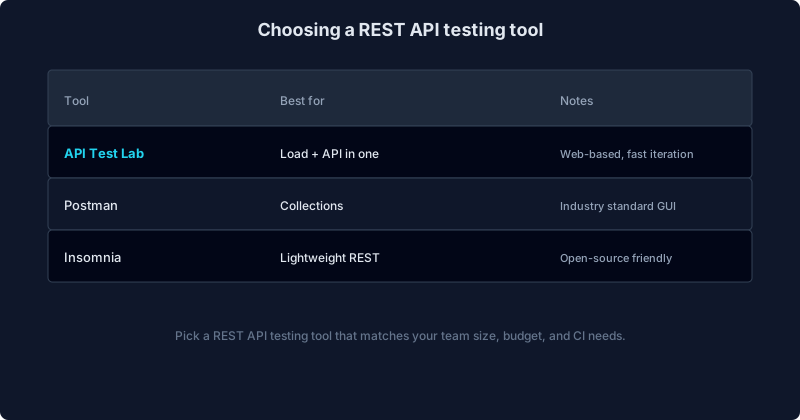
API Test Lab is a strong option for beginners and teams that want a straightforward testing experience. It is useful when you want a free API testing tool that helps you move quickly without a heavy setup. It is also a practical choice if you want API testing without Postman.
Postman remains a popular REST API testing tool because it offers collections, environments, pre request scripts, and test scripts in one place. It is flexible and familiar to many teams.
Insomnia is another solid choice, especially for developers who prefer a clean interface and simple request handling.
| Tool | Best For | Strengths | Limitations |
|---|---|---|---|
| API Test Lab | Beginners and teams | Simple setup, fast testing, easy workflow | May not fit every advanced pipeline |
| Postman | General API work | Large ecosystem, scripting, collaboration | Can feel heavy for simple tasks |
| Insomnia | Developers | Clean UI, good request handling | Smaller ecosystem than Postman |
Each tool can help you test endpoints effectively. The most important thing is choosing one and using it consistently.
For broader learning, reference MDN Web Docs, Swagger/OpenAPI documentation, RFC 9110 HTTP Semantics, more REST API testing guides, and JSON Schema as you deepen your implementation.
FAQ
Do I need to know programming?
No. You can start with a visual API client and learn the basics of requests, responses, and status codes before writing code.
What is the difference between unit tests and API tests?
Unit tests check small pieces of code in isolation. API tests check how endpoints behave when requests are sent over HTTP.
How often should I test?
Test during development, before releases, after major changes, and whenever critical endpoints are updated.
How do I know whether my API test passed?
Check the status code, response body, headers, and any validation rules you defined. A test passes only when all expected conditions are met.
How to test REST API endpoints manually?
Use an API client, send a request to the endpoint, and compare the response with the expected result. Then repeat the same checks with different inputs and error conditions.
Can I test APIs without Postman?
Yes. Many teams use API Test Lab, Insomnia, curl, browser based tools, or custom scripts.
Downloadable Checklist
To make this easier for readers, we offer a simple API Testing Checklist as a practical runbook. Include items such as setting the base URL, choosing the correct method, checking status codes, validating JSON, testing errors, and confirming authentication.
Create your free account to get updates when the printable PDF is available. Until then, save this article and use the sections above as your release sanity check.
Conclusion
REST API testing is one of the most practical skills you can learn if you build or ship software. It helps you confirm that endpoints behave correctly, return the right data, handle errors safely, and stay reliable as your application grows.
You now understand the core workflow, from HTTP methods and environment setup to response validation and automation. You also know the common mistakes to avoid and the tools that can make the process smoother. Whether you are using API Test Lab, Postman, or Insomnia, the key is to test consistently and document clearly.
Start with one endpoint. Validate the request. Check the status code. Inspect the JSON. Then automate the test once it is stable. That simple approach gives you a strong foundation for better releases and fewer surprises.
Start testing for free with API Test Lab and build your first repeatable API workflow today.
Next reads: REST API testing basics, API testing overview, Compare tools, Features, and Pricing when you are ready to scale.
More from the blog
Read 3 related articles from our latest posts.